- Why open-source email archiving needs an evidence-first design
- What FireXCore MailVault preserves
- How the MailVault architecture works
- Canonical messages are not the same as mailbox occurrences
- Supported email providers
- How to install FireXCore MailVault
- Validate Gmail or IMAP before starting an archive
- Run a resumable Gmail archive
- What the archive contains
- Practical use cases for MailVault
- Security and privacy model
- What MailVault is not
- Open-source quality and contribution
- Conclusion
Open-source email archiving should preserve more than a folder of downloaded attachments. In business, security, legal, and procurement workflows, the message itself is often the evidence: sender and recipient identities, delivery time, thread context, mailbox labels, message headers, MIME structure, inline resources, attachment occurrences, and the exact original bytes all matter.
FireXCore MailVault is a provider-neutral, read-only email evidence archiver for Gmail and standards-compatible IMAP servers. It stores complete messages as immutable raw EML objects, records mailbox and MIME provenance in SQLite, deduplicates non-body payloads by SHA-256 content hash, and generates traceable manifests for analytics, migration staging, eDiscovery preparation, security investigations, and procurement intelligence.
MailVault is available as an open-source project under the Apache License 2.0. The source code, architecture documentation, security model, operations guide, and contribution process are published in the FireXCore MailVault GitHub repository.
Current project status: MailVault is in public beta. Version 2.0.4 provides the current evidence model, Gmail and generic IMAP provider profiles, resumable synchronization, integrity verification, derived exports, and automated quality checks. Organizations should still test the software against representative mailboxes and their own governance requirements before relying on it in sensitive workflows.
Why open-source email archiving needs an evidence-first design
Many email export scripts begin with a simple requirement: connect to a mailbox and save every attachment. That approach may work for personal convenience, but it is too weak for operational analysis or defensible recordkeeping.
Consider a supplier quotation received by email. The PDF alone may not prove:
- which mailbox and label contained the message;
- who sent the quotation and who received it;
- whether the attachment was part of an original message or a forwarded copy;
- which request, reply, or negotiation thread it belonged to;
- when the supplier sent it and when the server recorded it;
- whether the same file appeared in multiple messages;
- which filename was used in each occurrence;
- whether the message also contained inline technical images or nested email evidence;
- whether a later extracted price or delivery date can be traced back to an exact source.
Filenames are not stable identities. Two different files may share the same name, and identical bytes may be attached under different names. Folder structures are also unreliable as a canonical model, especially in Gmail, where labels can make one message appear in several logical locations.
MailVault therefore treats the complete email message as the canonical acquisition unit. Attachments, inline resources, body alternatives, signatures, nested messages, encrypted containers, and unresolved MIME parts remain connected to that message through explicit evidence records.
What FireXCore MailVault preserves
The system separates canonical evidence from operational metadata and derived outputs. This separation makes the archive easier to verify, reproduce, migrate, and analyze without rewriting the original source material.
Immutable raw EML messages
Complete messages are written byte-for-byte as raw EML objects. The archive does not normalize the original headers, rewrite MIME boundaries, or modify the original message content. If malformed Unicode needs repair for a searchable metadata field, the repair is applied only to the derived value; the original EML remains unchanged.
Content-addressed MIME payloads
Retained non-body MIME payloads are stored by SHA-256 content hash. Identical attachment bytes therefore share one canonical stored object, even when they arrive through different messages, mailboxes, labels, or filenames.
Deduplication does not erase provenance. Every occurrence remains recorded with its source message, MIME part path, role, filename, content type, and object hash.
Mailbox and provider identities
MailVault records the identifiers required to interpret Gmail and generic IMAP correctly. Depending on the provider, this can include UID, UIDVALIDITY, Gmail message and thread identifiers, labels, flags, mailbox names, RFC Message-ID, In-Reply-To, and References.
MIME structure and defects
Email content is not always clean. Messages may contain malformed headers, broken charsets, nested messages, digital signatures, encrypted containers, TNEF payloads, duplicate filenames, or ambiguous MIME declarations.
MailVault classifies and preserves these parts without pretending that every object can be interpreted automatically. Difficult material remains available for later specialist processing.
How the MailVault architecture works
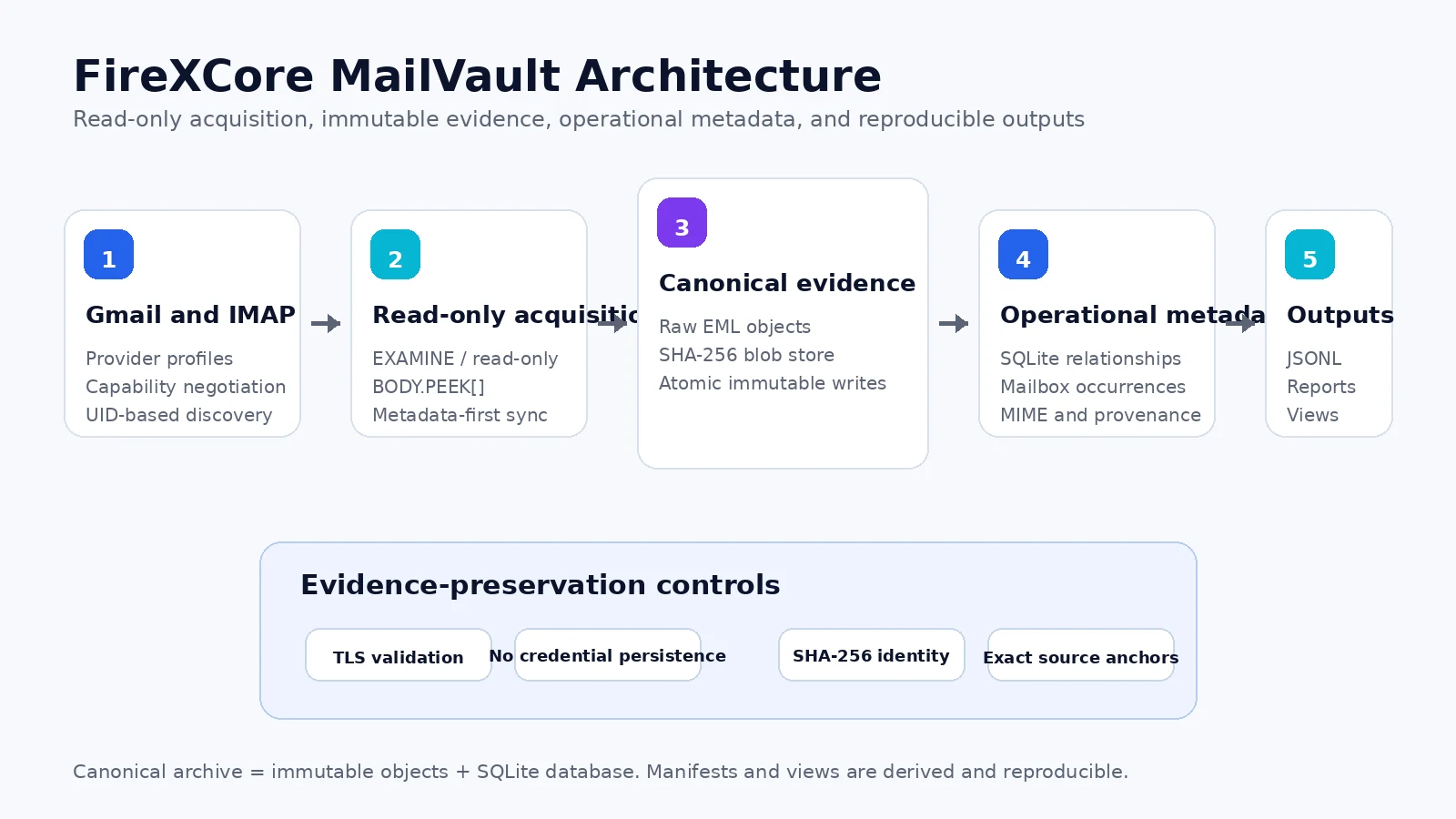
The architecture is divided into four responsibilities.
1. Read-only Gmail and IMAP acquisition
The acquisition layer negotiates server capabilities and performs UID-based discovery. Provider-specific behavior is handled through profiles rather than being embedded throughout the archive domain.
For Gmail, the provider profile can retain Gmail-specific message, thread, label, and raw-search metadata. Generic IMAP remains based on standards-compatible mailbox identifiers, message headers, and capabilities exposed by the server.
Message retrieval uses read-only mailbox selection and BODY.PEEK[], so acquisition does not intentionally mark messages as read. The archive core contains no command for deleting, moving, copying, appending, sending, relabeling, or changing message flags.
2. Canonical evidence storage
Raw messages and retained MIME payloads are written through atomic operations. Storage paths are based on content identity rather than untrusted filenames. This prevents a malicious or malformed filename from controlling the canonical object path.
3. Operational metadata in SQLite
SQLite records message identities, mailbox occurrences, participants, dates, headers, MIME parts, hashes, storage paths, parser defects, and synchronization state. Foreign-key relationships keep source records connected and support verification or regeneration of derived files.
4. Reproducible outputs
MailVault produces portable JSON and JSONL manifests, integrity reports, operational summaries, navigation views, and procurement source records. These outputs are derived from canonical objects and database relationships and can be rebuilt without modifying the original evidence.
Canonical messages are not the same as mailbox occurrences
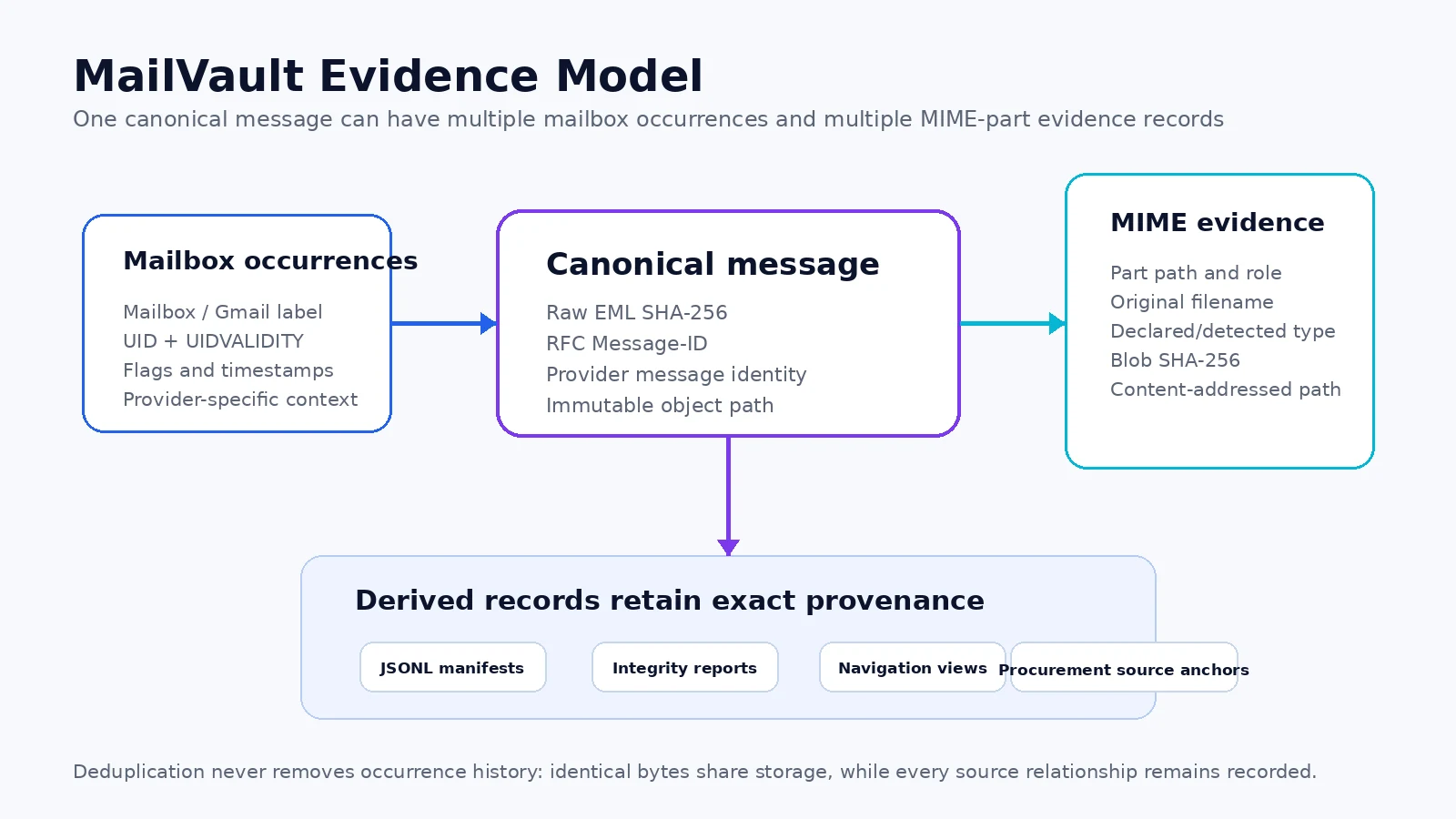
This distinction is one of the most important parts of the design.
A canonical message represents the evidence object itself. A mailbox occurrence represents where and how that message appeared: a Gmail label, an IMAP folder, a provider UID, associated flags, and provider-specific timestamps or context.
Without this separation, a Gmail archive can accidentally double-count the same message because it appears under several labels. It can also lose history when messages move between folders or when a provider exposes multiple logical views of the same object.
By separating identity from occurrence, MailVault can support more accurate thread reconstruction, response metrics, supplier-contact history, and mailbox migration analysis.
Supported email providers
| Provider profile | Authentication | Preserved provider context | Status |
|---|---|---|---|
| Gmail IMAP | App Password | Gmail message ID, thread ID, labels, raw-search support, IMAP metadata | Supported |
| Generic IMAP | Password or App Password | UID, UIDVALIDITY, RFC headers, mailbox data, advertised capabilities | Supported |
| Microsoft 365 | OAuth 2.0 | Exchange or Microsoft Graph identifiers | Planned adapter |
| JMAP | Provider-dependent | Email, Thread, Blob, and Mailbox identifiers | Planned adapter |
Generic IMAP is intended for standards-compatible services such as Dovecot, Courier, cPanel, Plesk, Zimbra, DirectAdmin, and many domain-email hosting platforms. MailVault discovers available capabilities rather than assuming server behavior from a hostname.
How to install FireXCore MailVault
MailVault requires Python 3.12 or newer. Clone the repository and install it in an isolated environment.
git clone https://github.com/FireXCore/mailvault.git
cd mailvault
pipx install .
For development or a source checkout on Windows PowerShell:
py -3.13 -m venv .venv
.\.venv\Scripts\Activate.ps1
python -m pip install --upgrade pip
python -m pip install -e .
On Linux or macOS:
python3 -m venv .venv
source .venv/bin/activate
python -m pip install --upgrade pip
python -m pip install -e .
Verify that the CLI and installed distribution report the same version:
mailvault version
python -m firexcore_mailvault version
Validate Gmail or IMAP before starting an archive
The doctor command checks TLS, authentication, server capabilities, provider behavior, and mailbox discovery without downloading the complete mailbox.
For Gmail:
mailvault doctor `
  --account user@gmail.com `
  --host imap.gmail.com `
  --provider gmail `
  --auth app-password
The Gmail App Password is requested through hidden terminal input. It should never be typed directly into the command line, committed to a repository, or stored in a configuration file. Google requires 2-Step Verification for accounts that are eligible to create App Passwords.
For a domain-hosted IMAP mailbox:
mailvault doctor `
  --account procurement@example.com `
  --host mail.example.com `
  --port 993 `
  --provider generic-imap `
  --auth password
Run a resumable Gmail archive
After a successful diagnostic check, start synchronization with an explicit destination and transfer limits:
mailvault sync `
  --account user@gmail.com `
  --host imap.gmail.com `
  --provider gmail `
  --auth app-password `
  --destination E:\MailVault `
  --scope all `
  --soft-cap 1GiB `
  --hard-cap 1.25GiB
MailVault uses metadata-first discovery, bounded fetch batches, checkpoints, retry controls, and rolling bandwidth limits. A run can be stopped and resumed using the same destination without starting the entire archive again.
Spam and Trash are excluded unless explicitly included. Operators should choose scope, retention, and mailbox coverage according to their legal authority and organizational policy.
What the archive contains
MailVault/
├── objects/
│   ├── raw/sha256/          immutable raw EML objects
│   └── blobs/sha256/        content-addressed MIME payloads
├── metadata/messages/       derived per-message JSON
├── database/mailvault.sqlite3
├── manifests/
│   ├── messages.jsonl
│   ├── message_occurrences.jsonl
│   ├── message_parts.jsonl
│   ├── blobs.jsonl
│   └── procurement_sources.jsonl
├── state/                   checkpoints, locks, bandwidth ledger
├── reports/                 run and integrity reports
├── logs/                    structured operational logs
└── views/                   disposable navigation pointers
The canonical archive consists of immutable objects plus the SQLite database. Metadata JSON, manifests, reports, and navigation views are derived outputs and can be regenerated.
Before transferring or importing an archive, run integrity verification:
mailvault verify --destination E:\MailVaultPractical use cases for MailVault
Email evidence and internal investigations
Organizations can preserve complete messages and attachment provenance for internal investigations, dispute analysis, audit preparation, incident timelines, and defensible recordkeeping.
MailVault is not a legal-hold or compliance-certification platform. It provides a technical evidence layer that can be integrated into a broader retention, access-control, and governance process.
eDiscovery preparation
Structured participant, thread, timestamp, mailbox, MIME, and hash data can reduce the effort required to locate and review relevant communication. The exact raw EML remains available when reviewers need to inspect the original source.
Mailbox migration staging
A canonical EML and metadata archive can provide a controlled staging layer before migration, consolidation, provider change, or long-term storage. Stable manifests make it easier to compare source and destination inventories.
Cybersecurity and incident response
A read-only archive can support phishing investigations, malicious-attachment correlation, communication timelines, and hash-based analysis without executing message content. Organizations planning a wider security program can also review FireXCore’s cybersecurity services.
Data analysis
JSONL exports make it possible to analyze communication volumes, sender domains, response patterns, attachment types, and thread relationships without repeatedly querying a live mailbox. FireXCore’s data analysis services can help organizations design reporting and analytics pipelines around structured operational data.
Procurement intelligence
MailVault was designed with procurement evidence in mind. The procurement manifest preserves source anchors needed to build a separate extraction and analytics layer for:
- supplier identity and communication history;
- RFQs, inquiries, quotations, purchase orders, invoices, shipping, and payment records;
- supplier response rate and response latency;
- quotation completeness and commercial deviations;
- price history with currency, quantity, unit, date, validity, freight, payment terms, and Incoterm context;
- requested versus offered product identities;
- technical substitution proposals, approvals, rejections, and supporting evidence;
- delivery and lead-time history;
- document and certificate provenance.
MailVault does not infer these facts inside the archive core. A separate, versioned extraction layer should derive business facts with confidence, extractor version, and exact citations back to the canonical message and MIME part.
Security and privacy model
Email must be treated as hostile input. Filenames, MIME headers, HTML, charsets, nested messages, attachment bytes, and server responses cannot be assumed to be safe.
MailVault implements controls including:
- TLS certificate validation;
- hidden credential input and no credential persistence;
- content-addressed paths independent of attachment filenames;
- atomic writes and SHA-256 integrity verification;
- SQLite transactions and foreign-key relationships;
- single-run locking;
- read-only IMAP acquisition;
- no attachment execution or rendering;
- structured logs that exclude raw message bodies and secrets.
The resulting archive may still contain highly sensitive personal, commercial, legal, and security information. Disk encryption, operating-system permissions, backup protection, retention policy, access review, and legal authorization remain the responsibility of the operator.
What MailVault is not
Clear limitations are essential for trustworthy infrastructure. MailVault is not:
- a managed enterprise journaling service;
- a legal-hold or compliance certification product;
- an email client;
- a mailbox cleanup or mutation tool;
- a malware sandbox;
- an OCR or document-understanding engine;
- a guarantee that encrypted, damaged, or visually unreadable content can be interpreted;
- a procurement decision engine.
Its responsibility is narrower and more defensible: acquire email through read-only operations, preserve complete source evidence, and expose traceable data for systems built on top of the archive.
Open-source quality and contribution
The public repository includes automated linting, formatting, static type analysis, tests, package-build validation, command-line smoke tests, dependency review, and CodeQL scanning. It also includes architecture, data-model, operations, security, troubleshooting, and contribution documentation.
Developers, security teams, records specialists, and procurement technologists can inspect the implementation, open issues, propose provider adapters, and contribute improvements through the project’s GitHub workflow.
Explore FireXCore MailVault on GitHub
Conclusion
FireXCore MailVault approaches email archiving as an evidence-preservation problem rather than a bulk attachment-download task. By preserving immutable raw EML, separating canonical messages from mailbox occurrences, storing payloads by SHA-256 content identity, and generating reproducible manifests, the project creates a strong foundation for email analysis, eDiscovery preparation, security investigations, migration staging, and procurement intelligence.
MailVault is open source under Apache License 2.0 and is available for technical review and contribution.
Frequently asked questions.
Answers connected directly to this article and its subject.
01 What is FireXCore MailVault?
FireXCore MailVault is a read-only, open-source email evidence archiver for Gmail and standards-compatible IMAP servers. It preserves complete raw EML messages, mailbox occurrences, MIME parts, SHA-256 content identities, and traceable manifests.
02 Does MailVault modify, move, or delete email?
No. MailVault is designed for read-only acquisition. The archive core does not include commands for deleting, moving, copying, appending, sending, relabeling, or changing message flags.
03 Does MailVault support Gmail?
Yes. The Gmail IMAP provider profile supports App Password authentication and preserves Gmail-specific message, thread, label, and raw-search metadata when exposed by the server.
04 Can MailVault archive non-Gmail mailboxes?
Yes. The generic IMAP provider supports standards-compatible servers and hosted domain-email platforms, using negotiated capabilities, UID, UIDVALIDITY, mailbox data, and RFC message headers.
05 How does MailVault deduplicate attachments?
MailVault stores retained non-body MIME payloads by SHA-256 content hash. Identical bytes share one canonical stored object, while every message occurrence, filename, MIME part, and source relationship remains recorded.
06 Does MailVault store Gmail App Passwords or mailbox passwords?
No. Credentials are requested through hidden terminal input and are not written to configuration files, SQLite, JSON, manifests, reports, or logs.
07 Is MailVault a legal-hold or compliance platform?
No. MailVault provides an evidence-preserving technical archive, but it is not a legal-hold, journaling, regulatory certification, or records-governance product. Organizations must apply their own legal, retention, access-control, and security requirements.
08 Can MailVault support procurement intelligence?
Yes. MailVault generates source records that retain exact links to messages, MIME parts, blob hashes, participants, dates, and provider context. A separate extraction layer can use those records to derive quotations, prices, supplier response metrics, technical substitutions, and other procurement facts with source citations.