- SilentCryptoMiner Malware: A Growing Threat to Online Security
- How SilentCryptoMiner Malware Spreads
- <strong>How SilentCryptoMiner Malware Works</strong>
- <strong>SilentCryptoMiner Malware’s Capabilities</strong>
- <strong>The Impact of SilentCryptoMiner Malware</strong>
- <strong>How to Protect Yourself</strong>
- Conclusion
SilentCryptoMiner Malware: A Growing Threat to Online Security
Cybercriminals are continuously evolving their tactics to exploit unsuspecting users, and the latest mass malware campaign highlights this growing concern. SilentCryptoMiner Malware, a malicious cryptocurrency miner, is being distributed under the guise of VPN and DPI bypass tools, infecting thousands of users. This article explores the tactics used by cybercriminals, the implications of such malware, and best practices to stay protected.
How SilentCryptoMiner Malware Spreads
Masquerading as Legitimate Tools
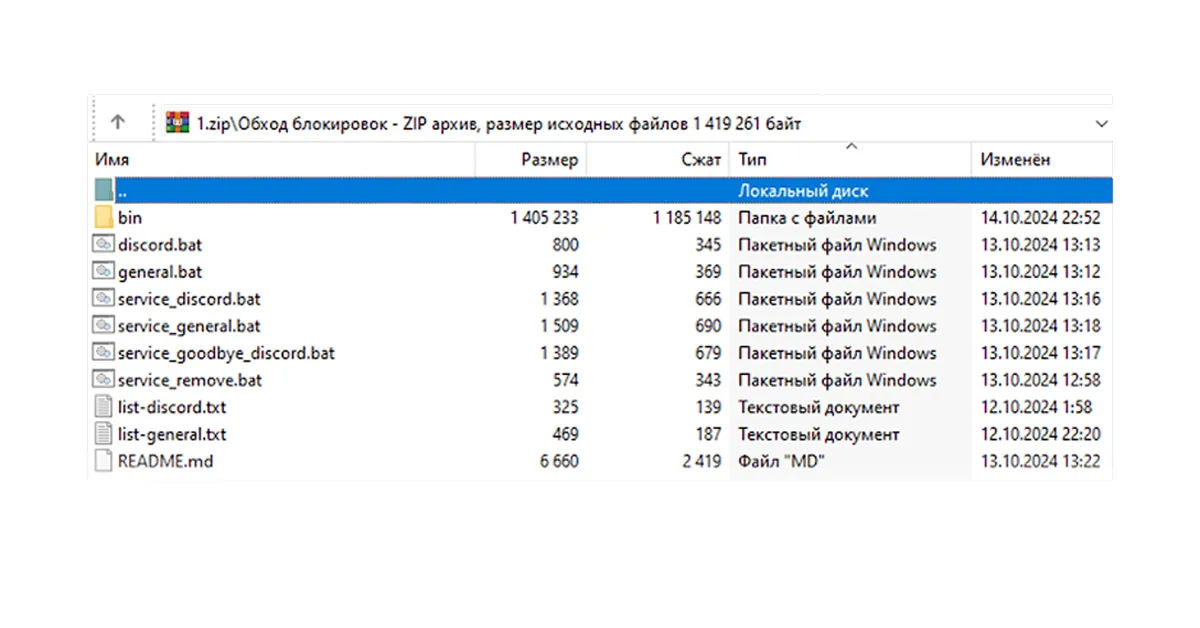
SilentCryptoMiner Malware is disguised as a tool that helps users bypass internet restrictions. Cybercriminals leverage the increasing demand for such software, particularly in regions with strict online censorship, to distribute malware. By promoting fake tools, they lure unsuspecting users into downloading compromised files.
Exploiting Windows Packet Divert (WPD) Tools
Russian cybersecurity firm Kaspersky has noted a rise in malware distribution through Windows Packet Divert (WPD) tools. Attackers bundle the malware with these tools, making users believe they are downloading legitimate software while, in reality, they are installing a cryptojacking payload. This technique has become increasingly popular among threat actors due to its effectiveness in bypassing security mechanisms.
Social Engineering Tactics
The malware campaign is propagated through:
- Fake Installation Instructions: Users are advised to disable security software due to “false positives.”
- YouTube Promotions: A channel with over 60,000 subscribers shared malicious links.
- Copyright Strike Scams: Threat actors impersonate developers to threaten YouTube channel owners, coercing them into sharing malware-infected links.
- Telegram and Other Platforms: Malicious versions of the software have been distributed via Telegram and similar platforms.
- Fake Reviews & Testimonials: Cybercriminals use deceptive testimonials to convince users of the software’s legitimacy.
How SilentCryptoMiner Malware Works
Malware Execution Process
- Initial Execution: The malware is hidden within a seemingly legitimate archive file containing a batch script.
- PowerShell Execution: The script runs a hidden executable via PowerShell.
- Evasion Techniques:
- If antivirus software deletes the file, users see an error message instructing them to disable security features and re-download the file.
- The malware checks for sandbox environments before execution.
- Windows Defender exclusions are configured to avoid detection.
- It artificially inflates the file size to bypass antivirus scans.
SilentCryptoMiner Malware’s Capabilities
- Process Hollowing: Injects miner code into system processes (e.g., dwm.exe) to avoid detection.
- Remote Control: Can be managed remotely via a web panel.
- Stealth Mining: Stops mining when certain processes (e.g., Task Manager) are running to prevent user suspicion.
- Self-Updating Mechanism: The malware can update itself to stay ahead of security countermeasures.
The Impact of SilentCryptoMiner Malware
Performance Degradation
Cryptocurrency mining consumes a significant amount of CPU and GPU resources, causing:
- Sluggish system performance
- Overheating and hardware damage
- Increased electricity consumption
- Reduced system lifespan
Security Risks
- Data Breaches: Cybercriminals can use malware infections to deploy additional spyware or keyloggers.
- Financial Losses: Infected systems contribute to illegal mining, benefiting attackers at the victim’s expense.
- Network Compromise: Once inside a system, attackers may pivot to other devices on the network, spreading infections.
How to Protect Yourself
Best Practices for Cybersecurity
- Verify Software Sources: Download only from official websites and verified sources.
- Use Reputable Security Software: Keep antivirus programs updated and active.
- Beware of Installation Instructions: If software prompts you to disable security tools, it’s likely malicious.
- Avoid Untrusted YouTube Links: Cybercriminals exploit social media for distribution—always verify sources.
- Monitor System Performance: Unusual CPU/GPU usage spikes may indicate cryptojacking activity.
- Educate Yourself: Stay informed about common cybersecurity threats and tactics.
- Regularly Scan Your System: Perform frequent malware scans to detect hidden threats.
Conclusion
SilentCryptoMiner Malware is a stark reminder of the importance of cybersecurity vigilance. By leveraging social engineering, evasion tactics, and system vulnerabilities, attackers are successfully infiltrating thousands of devices. Users must remain cautious, verify software sources, and employ robust security measures to mitigate such threats. Raising awareness about these threats can help prevent future infections and ensure a safer online experience.
Stay informed—share this article to help others protect themselves from malware attacks.
Frequently asked questions.
Answers connected directly to this article and its subject.
01 What is SilentCryptoMiner Malware?
SilentCryptoMiner Malware is a cryptojacking malware that disguises itself as a VPN or DPI bypass tool to infect users and mine cryptocurrency without their knowledge.
02 How does SilentCryptoMiner evade detection?
It uses process hollowing, disables security features, and stops mining when specific processes (e.g., Task Manager) are active.
03 How can I tell if my system is infected?
Look for unusual CPU/GPU spikes, sluggish system performance, and unexpected error messages related to antivirus software.
04 Can antivirus software detect SilentCryptoMiner?
Some antivirus programs can, but the malware is designed to bypass detection. Keeping security software updated is crucial.
05 How can I remove SilentCryptoMiner from my system?
Use a trusted malware removal tool, reset Windows Defender settings, and check system processes for suspicious activity.